





A product team flips the locale to Arabic, sets dir=”rtl” on the root element, and watches the whole interface mirror in one satisfying motion. Navigation moves right. Body copy aligns right. Arrows flip. It looks finished.
Three weeks after launch the support queue tells a different story. A customer’s phone number renders with the country code stranded on the wrong end. An email field jumps right-aligned the moment the user starts typing. An invoice total reads as a figure the finance team cannot reconcile. None of these are layout faults, which is exactly why none of them appeared in the mirrored screenshots everyone signed off on.
Right-to-left support is not one problem with one fix. It is three problems that sit in different parts of the organisation, and the mirroring everyone celebrates only solves the first.
What RTL language support actually means
RTL language support means an interface reads, flows and computes correctly in a right-to-left script, not simply that its layout has been mirrored. Setting the direction attribute solves roughly the first third of the problem.
The three layers break down cleanly. Layer one is layout mirroring: the direction attribute, logical CSS properties, and a settled rule for which icons flip. It is an engineering task with a visible finish line. Layer two is bidirectional text, governed by the Unicode Bidirectional Algorithm, and it only misbehaves when real content mixes scripts, which is why it survives QA and surfaces in production. Layer three is linguistic quality: whether the Arabic reads like Arabic, whether the typography holds, whether a native speaker would trust the interface enough to enter a payment card into it.
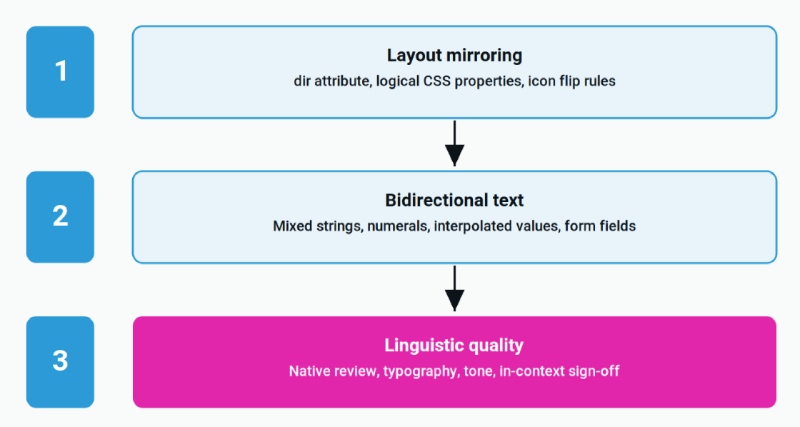
Teams that budget for layer one and treat the rest as polish end up rebuilding the locale within a year. The layers are sequential in delivery but they have to be planned together, which is why RTL belongs in the website and app localization scope from the beginning rather than in a follow-up ticket.
The four RTL languages that matter, and how they differ
Arabic, Hebrew, Persian and Urdu all run right to left, but they do not fail in the same way, and a fix that works for Hebrew will not save an Arabic build.
Arabic is cursive. Every letter takes up to four contextual forms depending on its position in a word, so text cannot be rendered by reversing a glyph sequence. Arabic has no uppercase and no native italic, which means any design system carrying hierarchy through capitalisation or italics loses that hierarchy entirely. Hebrew is non-cursive and simpler to render, but niqqud diacritics need vertical room that tight line heights do not give them. Persian shares the Arabic script with extra letters and defaults to Eastern Arabic-Indic numerals, so a figure that reads correctly for a Cairo user can look wrong to one in Tehran. Urdu uses Nastaliq, a sloping calligraphic style that needs substantially more vertical space than Latin text and is poorly served by most webfont stacks.
| Language | Script behaviour | What breaks first |
|---|---|---|
| Arabic | Cursive, four contextual letter forms | Truncation, lost italic hierarchy |
| Hebrew | Non-cursive, optional niqqud diacritics | Line height, clipped diacritics |
| Persian | Arabic script plus extra letters | Wrong numeral set, shared-font assumptions |
| Urdu | Nastaliq calligraphic style | Font fallback, vertical clipping |
The four major RTL scripts and the failure each one produces first.
Ship one RTL language properly, then add the second. Teams that launch all four at once discover four unrelated rendering problems in the same sprint and cannot tell which fix caused which regression.
Layout: what mirrors, and what must never mirror
Almost everything in an RTL interface mirrors, with one firm exception: icons that depict a physical object or a fixed convention stay exactly as they are.
The mirroring itself should not be hand-coded. Replacing physical CSS properties with logical ones means a single rule works in both directions, and there is nothing extra to maintain when a third locale arrives.
| Physical property | Logical equivalent | What breaks if left as is |
|---|---|---|
| margin-left, padding-right | margin-inline-start, padding-inline-end | Spacing collapses on the wrong side |
| text-align: left | text-align: start | Body copy stays left-aligned in Arabic |
| left: 0 | inset-inline-start: 0 | Positioned elements land off-screen |
| flex-direction: row-reverse | flex-direction: row | Double reversal, RTL renders as LTR |
| translateX animations | Direction-aware custom property | Drawers slide in from the wrong edge |
Five physical CSS patterns that break in RTL, and the logical property that fixes each one.
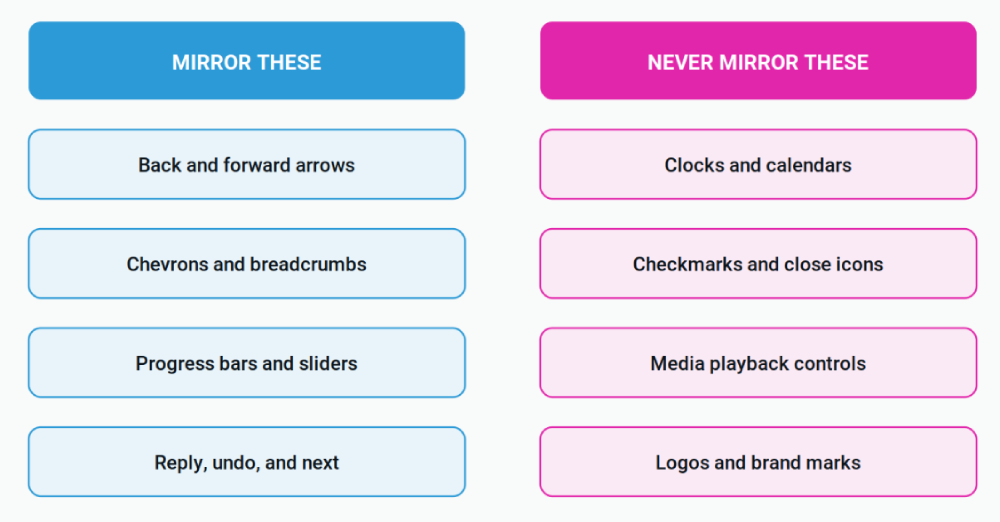
The icon question is where teams waste the most time, because it gets relitigated on every ticket. Settle it once. Icons describing movement through the interface flip: back and forward arrows, chevrons, breadcrumb separators, progress indicators, reply and undo. Icons describing a real object or a fixed convention do not, because clocks run clockwise in every language, a checkmark is a checkmark, media playback follows the timeline rather than the reading direction, and a logo is never mirrored. Tag every icon in the design system as directional or fixed and the question stops coming up.
Bidirectional text is where RTL breaks after launch
Bidirectional text is the RTL failure that survives QA, because it only appears when translated copy meets real runtime data. Screenshots taken with placeholder content will never show it.
The Unicode Bidirectional Algorithm, specified in Unicode Standard Annex #9, decides how mixed-direction runs are ordered on screen. Latin words, digits and most punctuation are treated as separate runs inside a right-to-left paragraph, and the neutral characters between them are resolved by context. That resolution is usually correct and occasionally very wrong, particularly at the boundary where a translated fragment meets an interpolated value.
Three patterns cause most production incidents. Interpolated variables come first: a welcome string carrying a Latin customer name, a version number or a currency amount will place its punctuation on whichever side the algorithm resolves to, not the side the designer drew. Inherently left-to-right form fields come second, because email addresses, URLs, phone numbers, passwords and payment fields need an explicit dir=”ltr” on the input or the cursor and the visible text disagree as the user types. User-generated content is the third, and dir=”auto” is the correct answer there, since the direction depends on what the user typed rather than on the interface locale.
The fix is cheap during implementation and expensive afterwards. Any string that concatenates translated text with a runtime value should be tested with a Latin value inside it before the locale ships.
Arabic typography and the performance cost most teams miss
Arabic webfonts are commonly two to five times larger than their Latin equivalents, so adding an Arabic locale can regress Largest Contentful Paint even when nothing else on the page changed.
The weight comes from the script itself. Contextual letter forms, ligatures and a wide diacritic range produce far more glyphs than a Latin face needs. The mitigations are standard and rarely applied on a first RTL launch: subset the font with unicode-range so a Latin visitor never downloads the Arabic file, preload the face that renders above the fold, and set font-display to swap so text is never invisible while the font arrives. Then test on throttled 4G rather than office wifi, because the Gulf, North Africa and South Asia are mobile-first markets and a fast network hides the problem completely.
Type sizing is the other half. Arabic and Persian glyphs sit smaller inside the same point size than Latin ones and carry marks above and below the baseline, so a heading that reads comfortably at 16 pixels in English usually needs more size and noticeably more line height in Arabic. Design systems that encode emphasis in italics need a different signal entirely, since italic has no equivalent in Arabic typography.
Route RTL strings by risk, not by locale
Not every Arabic string needs the same workflow, and treating a whole locale as one quality tier is how RTL budgets get out of control.
The NEX Translation Matrix™ scores each piece of content on five inputs: content type, business risk, customer impact, regulatory requirement and quality expectation. It produces one of three outcomes. AI drafting is sufficient, human linguists refine the meaning, or independent review signs the content off before publication.
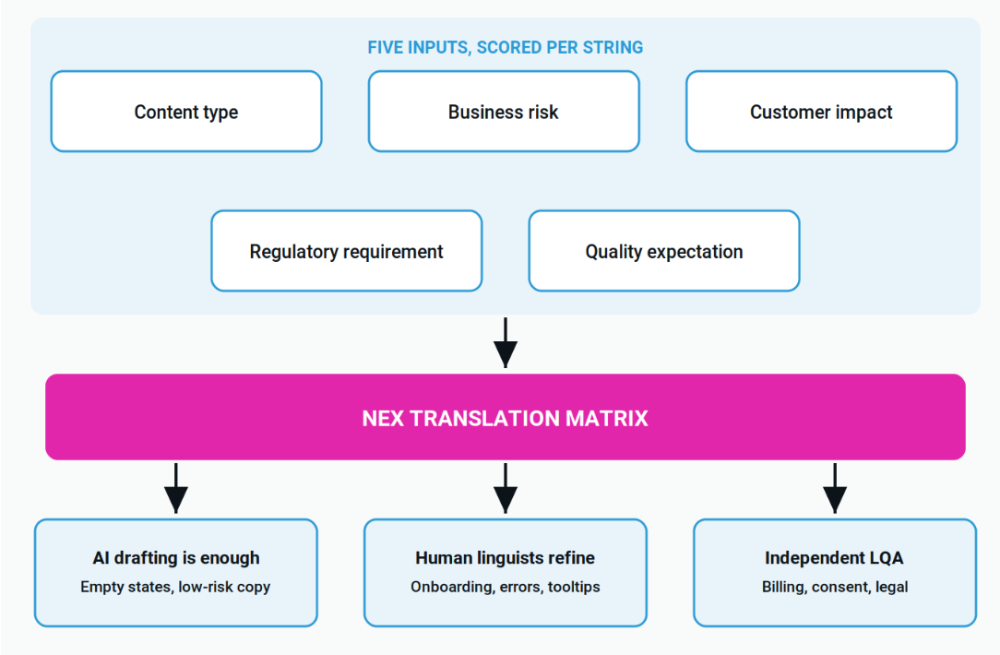
The rule that matters is that the matrix routes content, not projects. A single product release will produce all three outcomes at the same time. Empty states, tooltips and low-risk marketing copy can be machine drafted and reviewed. Onboarding flows, error messages and anything carrying the brand voice need a native linguist refining meaning on top of the draft, which is what machine translation post-editing (MTPE) delivers. Billing terms, consent language and any string a regulator could read need a second linguist through linguistic quality assurance (LQA) before it goes live.
RTL raises the stakes on that third band specifically. A bidirectional rendering fault inside a consent string or an invoice total is not a cosmetic bug, it is a compliance exposure, and it is invisible to everyone on the team who does not read the script. That is the argument for human sign-off on a narrow, well-chosen subset of the locale rather than on all of it. NexTranslate includes human proofreading at every tier of its transparent translation pricing, which keeps the low-risk band genuinely cheap without leaving it unreviewed.
How to test RTL before you ship
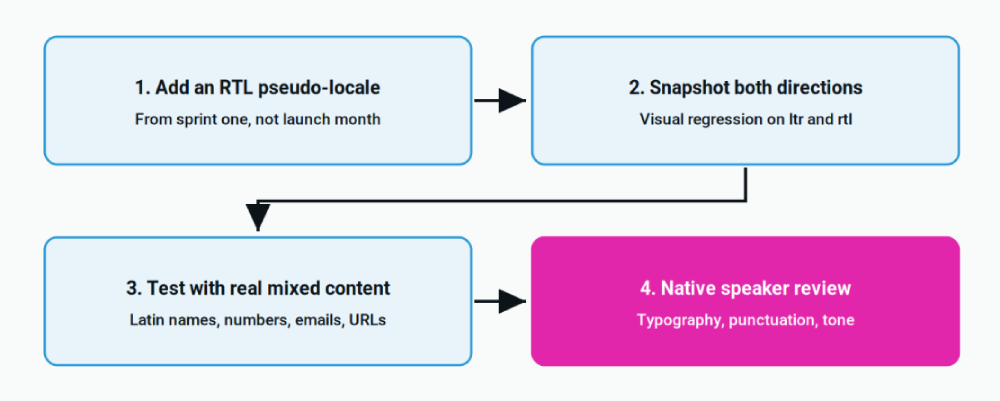
An RTL locale belongs in the test suite from the first sprint, not from the month before launch. Adding it late turns every accumulated physical CSS property into its own ticket.
Four practices catch most of it. Add an RTL pseudo-locale early, even with placeholder strings, so the direction attribute is exercised on every new screen. Run visual regression against both direction values, because a snapshot suite covering only left-to-right will happily approve a broken Arabic layout. Test with real mixed content rather than lorem ipsum, meaning Latin names, international phone numbers, email addresses and currency amounts inside translated sentences. Then put the result in front of a native speaker, because automated checks catch structural faults and are blind to copy that reads awkwardly because a content management system split a phrase across two elements.
There is a discovery layer to this as well. RTL locales need the same hreflang discipline as any other language version, and a mismatch between the declared language and the rendered direction is worth catching in the same audit that covers multilingual SEO fundamentals. Mobile teams should also treat store listings as a separate surface with its own rules, covered in the app store localization playbook.
Frequently asked questions
Is setting dir=”rtl” enough to support RTL languages?
No. The direction attribute handles layout mirroring, which is roughly the first third of RTL support. Bidirectional text handling and native linguistic review are separate problems the attribute does not touch.
Do all icons need to be mirrored in right-to-left layouts?
No. Directional icons that describe movement through an interface should mirror, including back arrows, chevrons, breadcrumb separators and progress indicators. Icons representing real objects or fixed conventions, such as clocks, checkmarks, media controls and logos, stay as they are.
Do numbers reverse in Arabic?
Digits themselves always read left to right, even inside a right-to-left paragraph. What changes is the surrounding punctuation and the numeral set, since Persian and some Arabic locales default to Eastern Arabic-Indic digits rather than Western forms.
Which right-to-left language should a SaaS product launch first?
Arabic in most cases, because it carries the largest addressable market and because solving Arabic solves most of the rendering problems Persian and Urdu will present later. Hebrew is the easier build but the smaller market.
Can machine translation handle Arabic UI strings?
For low-risk strings such as empty states and tooltips, an AI draft with human review is usually sufficient. Anything carrying legal, financial or safety weight should route to independent review, because a meaning or rendering error in Arabic is invisible to a team that cannot read the script.
Conclusion: RTL is an architecture decision, not a translation task
The teams that ship right-to-left interfaces well are not the ones with the best Arabic translators. They are the ones who decided, before writing a single string, that direction is a property of the layout system rather than a locale-specific patch. Logical CSS from the start, a settled icon taxonomy, explicit direction on inherently left-to-right fields, and a native reviewer on the strings that carry risk. Everything after that is cleanup.
The alternative is a mirrored screenshot that looks finished, a launch that reads fine to everyone who cannot read it, and a support queue that eventually explains the difference.
NexTranslate combines AI drafting with native linguist review across the full string lifecycle, from extraction through in-context QA. See what is covered in software UI translation, read the complete guide to website and app localization for the wider build, or request a quote to scope your first RTL locale.
Written by Karuppusamy Arunachalam, NexTranslate
Published September 2026 · Filed under Localization
