You translated the whole product into German, shipped it, and the conversion rate barely moved. Every string is grammatically correct. A native speaker can read every screen. And yet German users hesitate at signup, abandon the checkout, and never quite trust the app. Nothing is technically wrong with the translation, which is exactly why the problem is so easy to miss.
Translation is the part of going global that everyone remembers to budget for. Localization is the part that actually decides whether users in a new market activate and stay. The two are not the same, and the gap between them is made up of dozens of small adaptations that a word-for-word translation never touches: date formats, currency display, string length, payment methods, cultural cues, and compliance rules.
This checklist walks through every layer a SaaS product needs to adapt beyond the words themselves, in the rough order a team should tackle them. Use it as an audit of work you thought was already finished.
What Belongs on a SaaS Localization Checklist?
A SaaS localization checklist covers six layers beyond translation: locale formats, UI and layout, payments and pricing, cultural fit, backend and system content, and compliance. Translation handles the words. Localization handles everything a user in the target market expects the software to do.
The clearest way to think about it: translation is the one layer users consciously read, and localization is everything underneath that makes the product feel native. If you want the full conceptual breakdown of how the two relate, the guide on SaaS translation vs localization covers the distinction in depth. This post is the operational companion to it: the actual list of things to adapt.
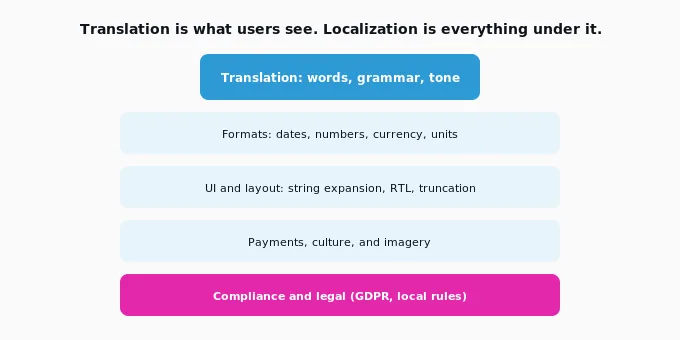
Translation is the visible top layer. A localization checklist works through the five layers beneath it that a translation alone never touches.
1. Locale Formats: Dates, Numbers, and Currency
Localize every value that changes shape by region: dates, times, numbers, currency, units, addresses, and phone numbers. These are the fastest way for a user to sense a product was not built for them, and they are almost never caught by translation.
A date like 07/18/2026 is unambiguous in the US and simply broken in most of the world, where users read the day first. The same is true of decimal separators (1,000.5 in the US becomes 1.000,5 in Germany and Brazil), currency symbols and their placement, measurement units, and address field order. A user rarely articulates why a form feels foreign. They just abandon it.
Checklist for this layer:
- Date and time formats follow the target locale, including 12 versus 24-hour clocks.
- Decimal and thousands separators match local convention.
- Currency is shown in the local currency with correct symbol placement, not converted USD.
- Units, address formats, and phone number patterns are localized.
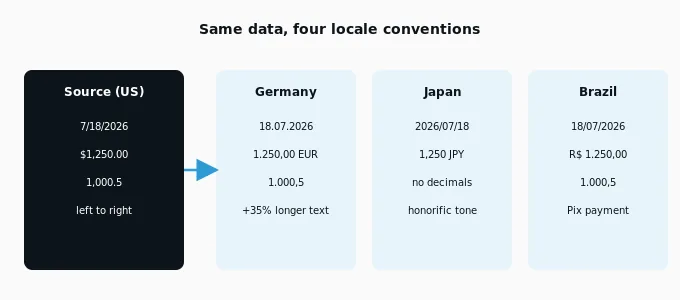
One value, four locale conventions. Formats break silently, which is why they belong at the top of any localization checklist.
2. UI and Layout: String Expansion and RTL
Adapt the interface itself, not just the strings inside it. Translated text changes length, and layouts designed only in English routinely truncate, overflow, or wrap badly in other languages.
German strings run roughly 30 to 35 percent longer than English, which turns tidy buttons into clipped labels and breaks fixed-width components. Right-to-left languages such as Arabic and Hebrew require the entire layout to mirror, not just the text to flip. This is where localization becomes a product and engineering task rather than a content one, and where dedicated software UI translation that reviews strings against the real interface prevents shipping a broken screen.
Checklist for this layer:
- Components tested for text expansion in the longest target language.
- No truncation, overflow, or overlapping elements after translation.
- Right-to-left layouts fully mirrored where relevant.
- Pluralization and gender rules handled per language, not hard-coded.
Here is the full checklist at a glance, with who typically owns each layer:
| Layer | What to adapt | Usual owner |
|---|---|---|
| Formats | Dates, numbers, currency, units, addresses | Engineering + locale config |
| UI and layout | String expansion, RTL, truncation, pluralization | Product + engineering |
| Payments and pricing | Local currency, methods, tax, PPP display | Growth + finance |
| Cultural fit | Imagery, color, idioms, examples, tone | Content + marketing |
| Backend and system | Emails, error messages, invoices, notifications | Engineering + content |
| Compliance | Privacy notices, GDPR, local legal terms | Legal + localization QA |
The six localization layers a translated SaaS product still has to work through, and the teams that typically own each.
3. Payments and Pricing
Localize the money, not just the price tag. Users expect prices in their own currency, payment methods they already use, and pricing that reflects local purchasing power, and any gap here shows up directly in checkout abandonment.
Displaying prices in foreign currency forces the user to do mental math and quietly signals the product is not really for their market. Missing a locally dominant payment method, such as Pix in Brazil, iDEAL in the Netherlands, or SEPA in the eurozone, is worse: a meaningful share of buyers abandon a purchase when they do not see a payment option they trust. Tax display rules also vary, with many markets expecting tax-inclusive pricing rather than the US pattern of adding it at the end.
Checklist for this layer:
- Prices display in local currency with correct formatting.
- Locally preferred payment methods are supported at checkout.
- Tax display follows local expectations (inclusive versus added).
- Pricing is reviewed against local purchasing power, not just converted.
4. Cultural Fit and Content
Adapt the meaning, not only the words. Imagery, color, idioms, examples, and tone all carry cultural weight, and a literal translation can preserve the sentence while losing the message.
A marketing headline built on an English idiom often translates into nonsense. Screenshots showing US-specific workflows, holidays, or names quietly tell international users the product was designed for someone else. Formality expectations differ sharply, with Japanese and German audiences generally expecting a more formal register than US copy. This is the layer where machine translation post-editing matters most, because a human editor catches the cultural misfires that fluent machine output sails straight past.
Checklist for this layer:
- Imagery and screenshots reflect the target market, not the home market.
- Idioms and examples are adapted, not translated literally.
- Tone and formality match local expectations.
- Colors and symbols carry no unintended local meaning.
5. Backend, System Messages, and the Invisible Content
Localize the content users do not think about until it fails: transactional emails, error messages, invoices, push notifications, and support paths. Half-localized products are the most common outcome of a translation-only effort, and the untranslated backend is where the seams show.
A Japanese user who navigates a perfectly localized interface, then receives an English error message or a US-formatted invoice, immediately feels the product is held together with tape. These touchpoints sit outside the main UI, so they are the easiest to forget and the most damaging to trust when missed. A complete checklist treats them as first-class localization work, not an afterthought.
Checklist for this layer:
- Transactional and lifecycle emails localized, including subject lines and send timing.
- System and error messages translated and format-aware.
- Invoices, receipts, and PDFs follow local format and language.
- Support hours, contact paths, and help content localized.
6. Compliance and the Order to Do All of This
Localize for local law, and sequence the whole effort by market commitment. Compliance content such as privacy notices and consent flows is not optional in regulated regions, and the rest of the checklist should be phased rather than done all at once.
In the EU, GDPR shapes how consent and privacy copy must read; other regions have their own equivalents. For regulated or legally sensitive content, an independent linguistic quality assurance pass verifies the localized text is accurate before it ever reaches a user. But you do not localize everything on day one. The practical order is to translate the core journey to test demand, then localize formats, UI, and payments once you commit to a market, then move to continuous localization as you scale.
This phased approach also aligns with the NEX Framework™ (Need → Economics → eXecution). Teams first validate market demand (Need), then evaluate whether deeper localization investments make commercial sense (Economics), and finally implement the operational changes needed to deliver a truly localized product (eXecution).
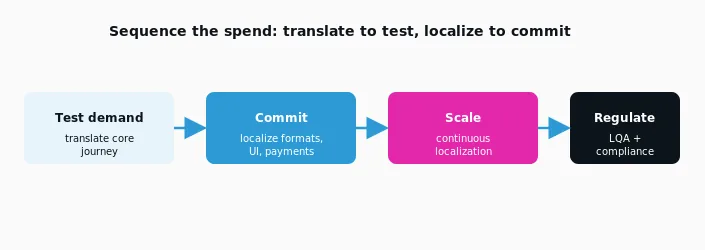
Sequence the checklist by commitment. Translate the core journey to test a market, then localize the layers that drive conversion once the market is worth the investment.
The engineering groundwork that makes all of this repeatable is internationalization. If your codebase still hard-codes strings and assumes one locale, the guide on how to internationalize your SaaS product is the place to start, and continuous localization is the operating model that keeps localized versions in sync once you ship frequently.
What This Costs, and Where a Partner Fits
A localization checklist this long is exactly why teams eventually stop doing it ad hoc. The layers that move conversion, formats, UI, payments, and compliance, are the ones that most reward a repeatable workflow and human review, rather than a one-off translation pass.
NexTranslate handles the full checklist across both the translation and localization layers, with website and app localization that reviews content against the real product rather than in a spreadsheet. Human proofreading is included at every tier of its transparent per-word pricing, so the quality step is never the line item a team cuts to save money. The point of a partner is not to outsource the checklist. It is to make sure none of its layers get quietly skipped.
Frequently Asked Questions
What is the difference between translation and localization for SaaS?
Translation converts the words from one language to another. Localization adapts the whole product experience for a market, including formats, UI layout, payments, culture, and compliance. A SaaS product can be fully translated and still poorly localized, which is usually why a readable product still fails to convert.
Do I need to localize my entire SaaS product at once?
No. The practical approach is to translate the core user journey (signup, onboarding, primary workflow) to test demand, then localize formats, UI, and payments once you commit to a market, then scale to continuous localization. Localizing everything before validating demand wastes budget.
Which localization layer has the biggest impact on conversion?
Formats and payments usually move conversion the most. Currency displayed in the wrong denomination, confusing date formats, and missing local payment methods each cause measurable checkout abandonment, often more than translation quality itself.
How does string expansion affect SaaS localization?
Translated text changes length, and German runs roughly 30 to 35 percent longer than English. Interfaces designed only in English will truncate or overflow, so components must be tested for expansion and, for right-to-left languages, mirrored entirely. This makes UI localization a product and engineering task, not just a content one.
Can machine translation handle a full localization checklist?
Machine translation handles the words but not the layers around them. It does not localize formats, adapt payments, catch cultural misfires, or verify UI layout. A hybrid workflow, machine draft plus human review and post-editing, covers the full checklist far more reliably than unreviewed machine output.
Conclusion: Translation Is the First Layer, Not the Finished Product
A translated SaaS product is readable. A localized one is trusted. The difference is the checklist above: the formats, interface behavior, payments, cultural cues, backend content, and compliance work that a word-for-word translation never touches. Most teams that feel disappointed by their international numbers have not written bad translations. They have shipped an unfinished localization.
If you are not sure which layers your product has actually covered, that is worth a look before you spend more on new-market growth. Request a localization assessment and we will map your product against this checklist and show you where the gaps are.
Written by: Karuppusamy Arunachalam, NexTranslate
Published: July 2026 · Filed under Localization