Most localization budgets pay for the same sentence more than once. A release note gets translated in March, the same paragraph ships again in June with two words changed, and a different translator is paid the full rate to translate it from scratch. Meanwhile the German UI now calls one feature by three different names, and a support agent in Munich is answering tickets about a button that does not seem to exist.
Both problems have the same cause: nothing is remembering the decisions already made. Translation memory remembers sentences. A glossary remembers terms. Together they are the two language assets a company actually owns, which is why the modern localization tech stack treats them as the layer that compounds rather than the layer that gets rented.
This post covers how the two work together, how translation memory match bands turn into money, how to build a glossary that people use, and the ownership and hygiene rules that decide whether the assets keep paying back or quietly start costing more.
What Is Translation Memory, and How Does a Glossary Work with It?
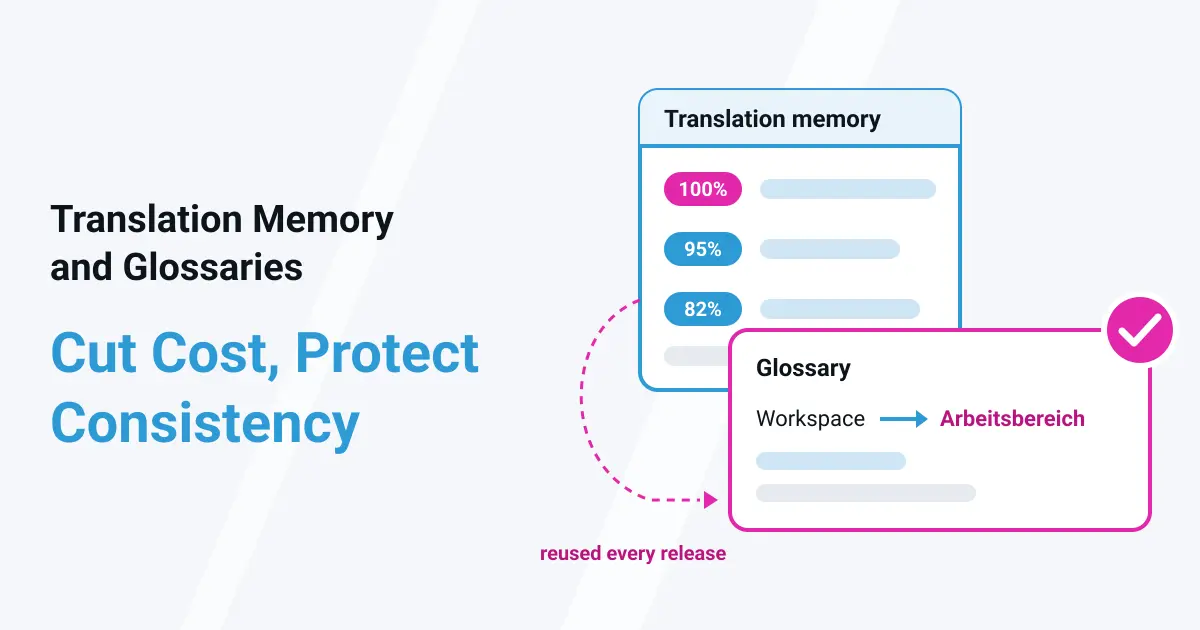
Translation Memory (TM) is a database of approved source and target segments, usually sentences, that is searched every time new content arrives. A glossary is a list of approved terms and how each one must be translated. The TM reuses whole sentences; the glossary governs individual words inside every sentence, including the ones the TM has never seen.
The two do different jobs, and confusing them is the most common reason a team says its glossary "did not work". A glossary does not reduce cost on its own. A translation memory does not stop a new sentence from using the wrong product name. Each covers the other's blind spot.
| Asset | What it stores | What it prevents | Who maintains it |
|---|---|---|---|
| Translation memory | Approved sentence pairs, with match scores | Paying twice for the same sentence | Filled automatically on approval |
| Glossary (termbase) | Approved terms, forbidden terms, do-not-translate list | The same term translated three ways | A named owner per language |
| Style guide | Tone, formality, punctuation and format rules | Copy that is correct but off-brand | Marketing and the lead linguist |
In practice, every incoming segment passes through both. The TM lookup decides how much work the segment needs; the glossary check decides whether the result is allowed to ship.
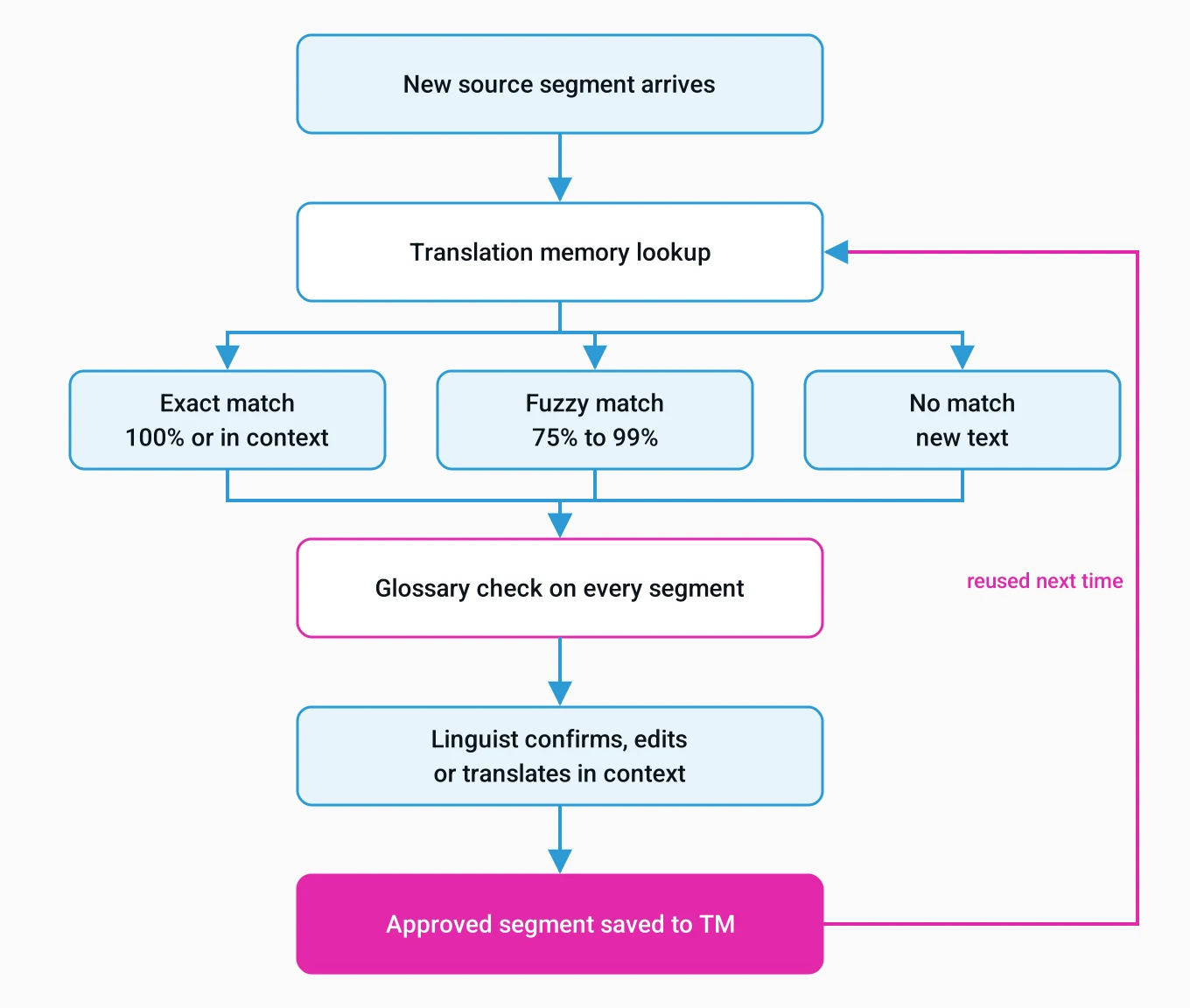
The takeaway: if a team has only one of the two, it is paying for the gap. A TM without a glossary keeps consistency at sentence level and loses it at word level. A glossary without a TM keeps terms right and pays full rate for every repeat.
How Translation Memory Cuts Cost: Match Bands Explained
Translation memory cuts cost by scoring every new segment against what has already been approved and billing it by how close the match is. An exact match is billed at a fraction of the full word rate, a close fuzzy match at roughly half, and only genuinely new text at the full rate.
The score is a percentage similarity between the new source segment and the closest stored one. Vendors group scores into bands and attach a billing percentage to each band. The grid differs between providers, so the numbers below are common market ranges rather than any one company's rates.
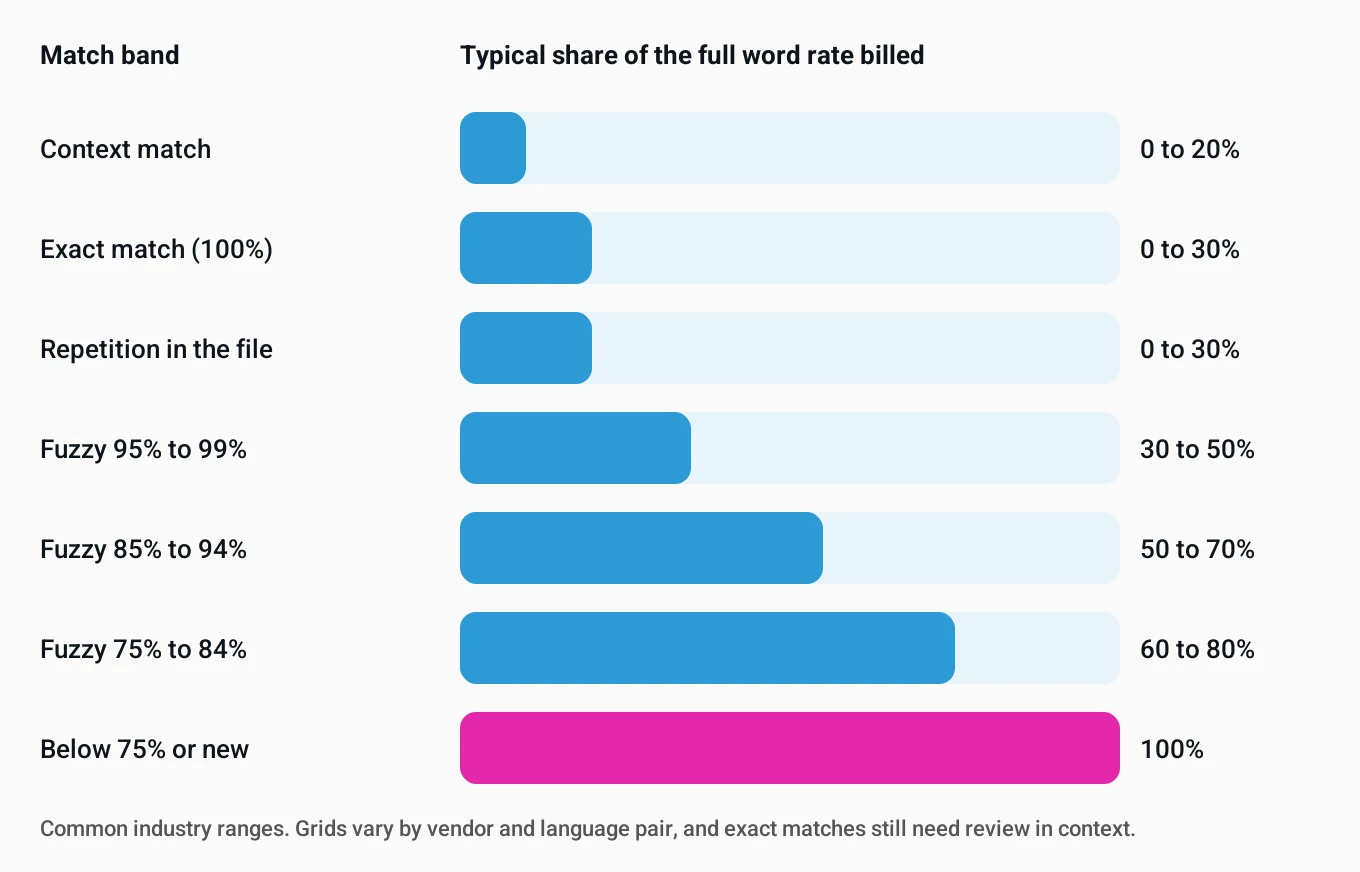
Exact matches are rarely free, and they should not be. A 100 percent match still needs someone to confirm it fits the new context: the same English sentence can need a different translation in a legal notice than in a tooltip. The small charge pays for that check.
A Worked Example on a 10,000-Word Release
Take a mature product where half the words in a release already exist in the TM in some form. Using an illustrative full rate of 0.10 per word (not a quoted price), the analysis looks like this:
| Match band | Words | Share of rate | Cost |
|---|---|---|---|
| New text (below 75%) | 5,000 | 100% | 500.00 |
| Fuzzy 75% to 94% | 1,500 | 60% | 90.00 |
| Fuzzy 95% to 99% | 500 | 35% | 17.50 |
| Exact and context matches | 2,000 | 20% | 40.00 |
| Repetitions within the release | 1,000 | 20% | 20.00 |
| Total | 10,000 | 667.50 |
A saving of about 33 percent on one release is useful. The bigger number is the trend: every approved segment raises the match rate of the next release, so the saving grows with the product.
What Leverage to Expect
Leverage, the share of words with some TM match, depends on the content more than on the tool. Software UI, help centres and product documentation repeat heavily and often reach high leverage within a few releases. Marketing campaigns, blog posts and transcreated ads rarely repeat and stay close to zero. A first project in a new language starts at zero for everything, which is why quotes for the first release are always the highest. For how leverage sits alongside the other cost factors, see what drives translation pricing.
How a Glossary Protects Consistency
A glossary protects consistency by fixing one approved translation for each term that matters and checking every segment against it before delivery. Without one, each translator makes a reasonable choice, and three reasonable choices across three releases become three names for the same feature.
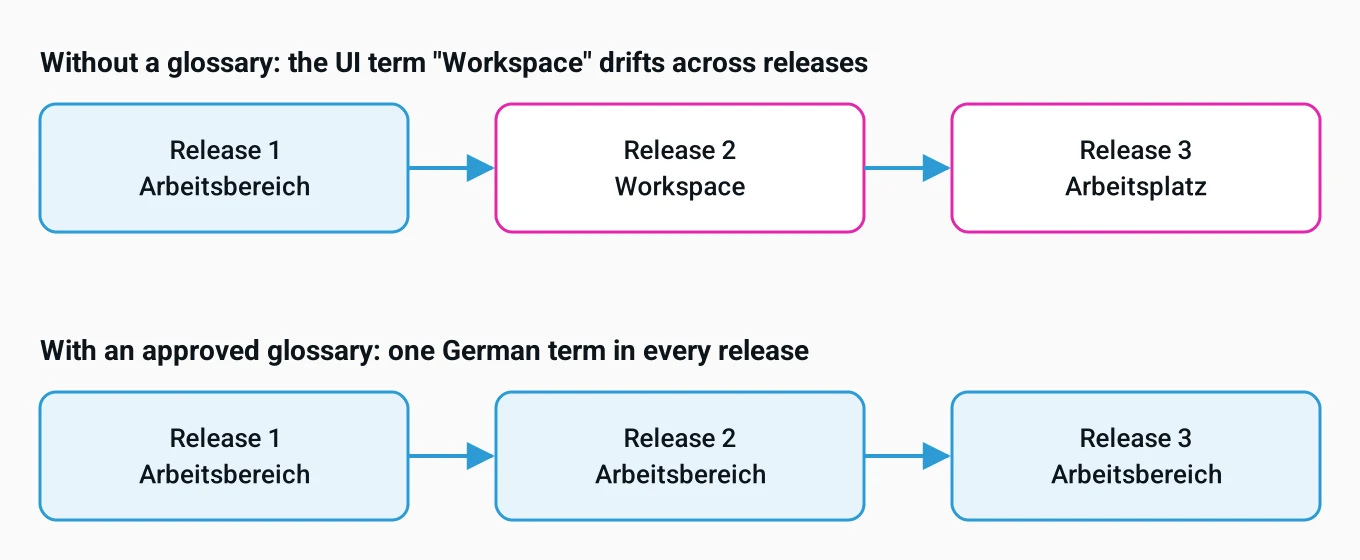
Drift is expensive in ways that do not appear on the translation invoice. Support articles stop matching the interface, search inside the help centre fails, and in regulated content an inconsistent term can be read as two different obligations.
How to Build a Glossary People Actually Use
- Start with 50 to 150 terms, not 1,000. Product and feature names, UI labels that appear in documentation, industry terms with more than one valid translation, and legal or pricing words.
- Record three lists, not one: approved terms, forbidden terms (the translations that keep creeping back), and do-not-translate terms such as brand names and code identifiers.
- Add a one-line definition and a context note for each entry. A term without context gets applied in the wrong place.
- Name one owner per language who approves changes. A glossary anyone can edit is a suggestion list.
- Review it each quarter against support tickets and LQA findings, then retire terms the product no longer uses.
The fix for most glossary failures is the owner, not the format. Spreadsheets, termbases and TMS features all work once someone is accountable for what goes in.
Translation Memory and Glossaries in AI Translation
In an AI-assisted workflow, translation memory and glossaries stop being only a discount mechanism and become the context the AI drafts from. Close fuzzy matches and the relevant glossary entries are passed to the engine with the new segment, so the first draft already follows approved wording.
This is where most of the quality gain in modern Machine Translation Post-Editing (MTPE) comes from. A generic engine guesses at terminology; an engine given the glossary entry for the term and the three closest approved sentences rarely does.
The flip side is less obvious. A TM full of unreviewed or outdated segments now degrades every AI draft that uses it, not just the occasional fuzzy match. Before connecting a TM to an AI workflow, clean it.
Keeping a Translation Memory Clean
A translation memory stays valuable only if what goes into it was reviewed and what stays in it is still true. Every unreviewed segment is a mistake that will be offered back as a match, billed at a discount and accepted with less scrutiny.
- Write to the TM only after human approval. Raw machine output should never land in the production memory.
- Split memories by domain when the same source means different things, for example marketing versus legal.
- When the product renames a feature, update the glossary first, then search the TM for the old term and fix or retire those segments.
- Penalise or retire segments from vendors or periods with known quality problems instead of deleting history.
- Run sample checks on high-leverage content, because a 100 percent match is where errors hide longest. Independent Linguistic Quality Assurance (LQA) on a sample each quarter is usually enough.
Who Owns Your Translation Memory?
The company that paid for the translations should own the translation memory and glossary, and the contract should say so. Without an explicit clause, the TM often sits in the vendor's system and leaves with the vendor.
Both assets have open exchange formats. TMX (Translation Memory eXchange) is the long-standing standard for moving a TM between tools, published in its 1.4b version by GALA. TBX does the same for termbases. Any vendor or translation management system worth using can export both without a support ticket.
Three questions settle ownership before a project starts: who owns the TM and glossary, in which format will they be delivered on request, and how often will an export be sent. If the answers are vague, switching vendors later means starting again at zero leverage.
Routing Matched Content with the NEX Translation Matrix
A high TM match lowers the cost of a segment, not its risk. The NEX Translation Matrix™ decides how much review a segment needs from five inputs: content type, business risk, customer impact, regulatory requirement and quality expectation. The match band is a sixth signal on top, never a replacement for them.
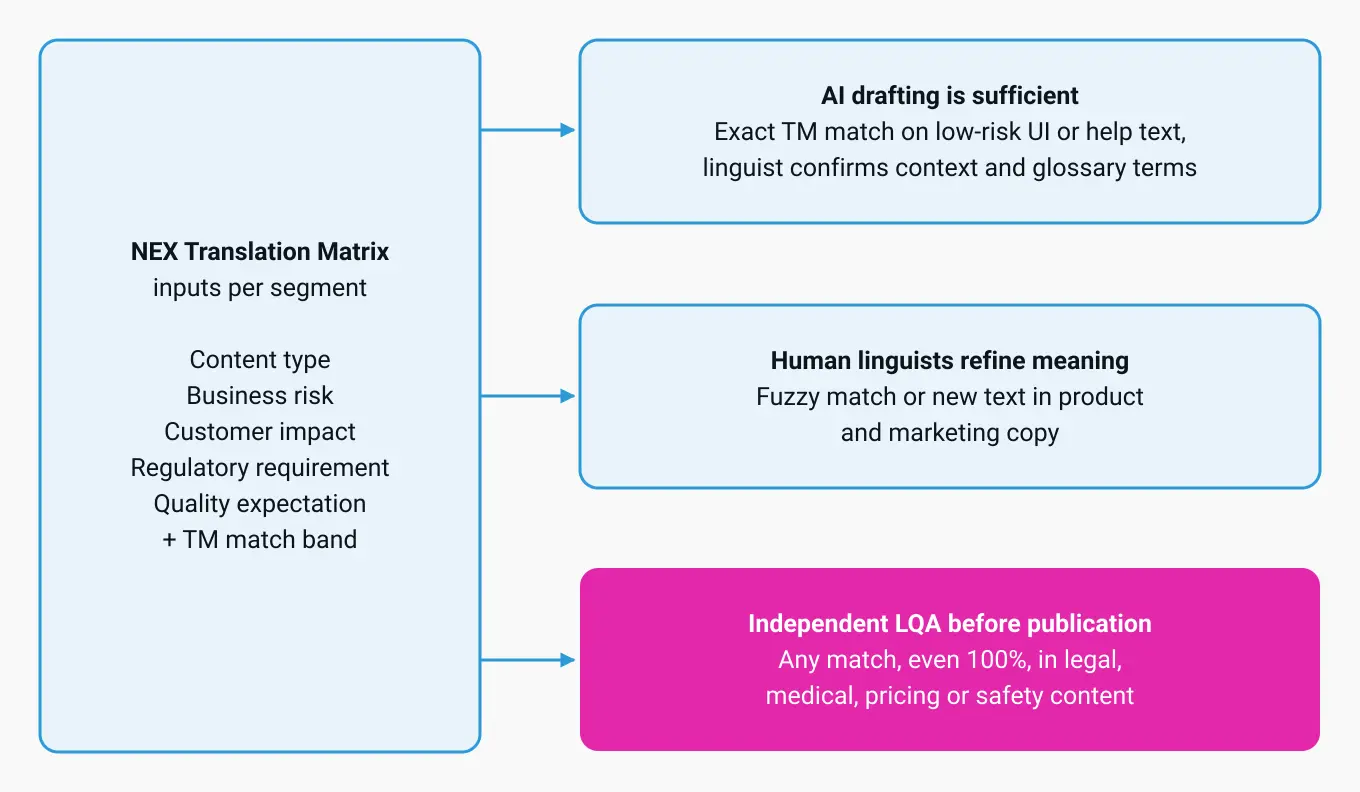
The matrix routes content, not projects. One release usually contains all three outcomes at once: exact matches in help text where the AI draft stands and a linguist only confirms context and glossary terms, fuzzy matches in onboarding copy that need a linguist, and a changed pricing clause that needs independent review even though the TM matched it at 100 percent. Routing runs per string or per document, never per job.
How NexTranslate Handles Translation Memory and Glossaries
Every NexTranslate service level starts with an AI draft that a human linguist then reviews or translates, so the memory and glossary feed the draft and the linguist confirms what ships. The ownership questions above are worth asking any vendor, NexTranslate included, before the first project starts.
Terminology and glossary management is built into the Premium service level, and glossary creation or style guide development can be added to any project and is quoted up front. Volume and recurring work, the situations where TM leverage is highest, can qualify for lower rates, as set out in NexTranslate pricing. For teams that update content continuously, multilingual content management covers translation memory and glossary maintenance, string updates and review in one workflow across the systems the team already uses.
Frequently Asked Questions
What is the difference between translation memory and a glossary?
Translation memory stores whole approved sentences and reuses them; a glossary stores approved terms and enforces them. The TM lowers cost on repeated text, while the glossary keeps key terms consistent in every segment, including new ones the TM has never seen.
How much can translation memory save?
It depends on how much of the content repeats. In the worked example above, a release with half its words matched cost about a third less. Software UI and documentation repeat enough to get there, while one-off marketing content saves very little. The first release in any language saves nothing, because the memory starts empty.
Are 100 percent TM matches free?
Usually not, and they should not be. An exact match still needs a linguist to confirm it fits the new context, so most vendors bill exact and context matches at a small share of the full rate rather than zero.
Who owns the translation memory, the client or the vendor?
The client should, and the contract should state it. Ask for the TM in TMX format and the glossary in TBX or a spreadsheet, and agree how often exports are delivered, so a change of vendor does not reset leverage to zero.
Does translation memory still matter with AI translation?
Yes, more than before. AI engines draft better when given close TM matches and glossary terms as context, so a clean memory improves every AI draft, while an unreviewed one spreads its errors into them.
Conclusion: The Memory Is the Asset, the Glossary Is the Rulebook
Tools change every few years. The translation memory and the glossary are what carry over, and they are the only parts of a localization program that get cheaper and better with use. Teams that treat them as owned, reviewed assets pay less per release and ship one product in every language, not a slightly different product in each.
If your TM sits in a vendor's system you cannot export, or your glossary has no owner, that is the place to start. To see how memory and glossary work would apply to your own content, send a sample and request a quote.