




The request almost always arrives the same way. A release ships, three locales fall behind, someone emails a spreadsheet called strings_final_v4.xlsx to a vendor, and by Friday a product manager is asking whether the company needs a translation management system.
Sometimes the answer is yes. Just as often the spreadsheet is a symptom rather than the disease, and buying software would formalize a broken process instead of fixing it. The difficulty is that nearly every article defining a translation management system was published by a company that sells one, so the second half of the question rarely gets an honest answer.
This post answers both halves. What a translation management system does, what it does not do, and a threshold test for working out whether a team has crossed the line where one starts paying for itself.
What is a translation management system?
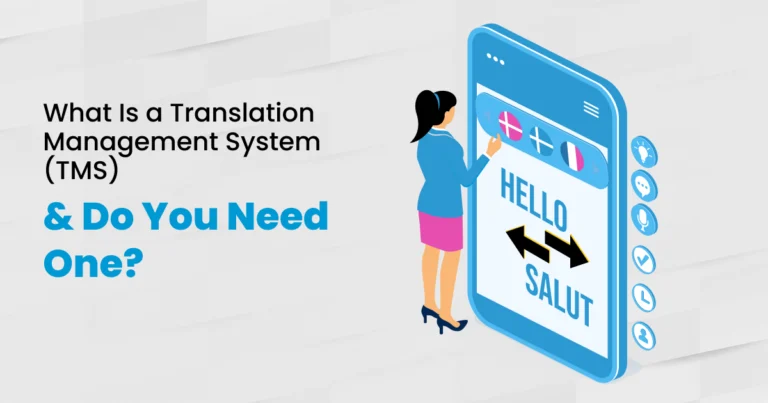
A Translation Management System (TMS) is software that keeps multilingual content in one place, detects what changed, routes each item to the right translator or reviewer, and reuses wording that has already been approved. It manages the process around translation. It does not do the translating.
That distinction matters because a TMS is routinely confused with three things it is not. A computer-assisted translation tool is the linguist’s editing environment. A machine translation engine produces raw output. A language services partner supplies the people. A TMS calls the engine, often hosts the editor, and assigns work to the people, but on its own it produces nothing.
| Tool | What it provides | What it does not provide |
|---|---|---|
| Translation Management System | Storage, routing, versioning, memory, reporting | Linguists, judgment, source quality |
| CAT Tool | The editing environment for a single document | Project visibility across locales |
| Machine Translation Engine | A raw draft in seconds | Any assurance the draft is publishable |
| Language Services Partner | Native linguists, reviewers, accountability | Your internal content workflow |
A TMS is the coordination layer. The other three rows are what people mean when they say a TMS did not fix the problem.
The practical test is simple. If the pain is that translations keep coming back wrong, a TMS will not fix it. If the pain is that nobody can say which version is current, it might.
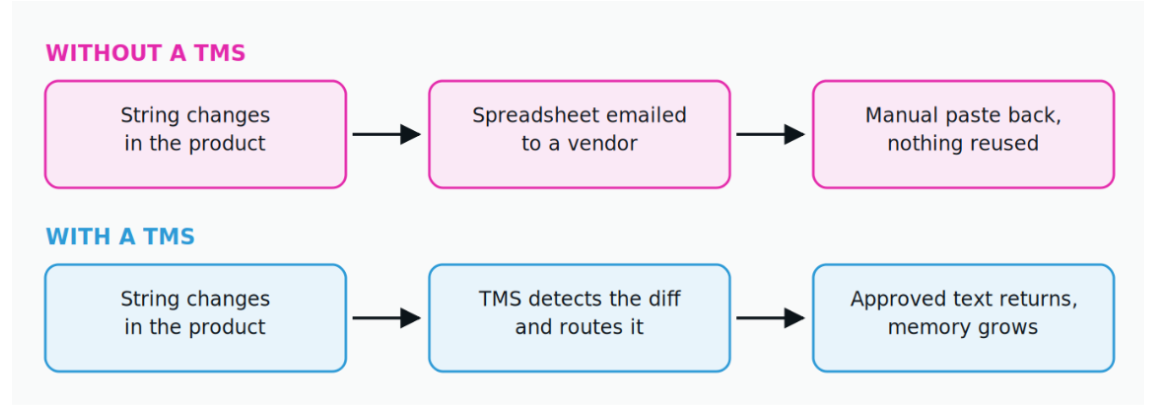
The same changed string, handled two ways. Notice that the difference is not speed, it is whether anything is retained afterwards.
What a TMS actually does, component by component
Five components do the real work in every system worth shortlisting: a content store, translation memory, a workflow engine, connectors, and quality reporting. Almost every other line on a vendor comparison chart is a variation on those five.
Translation Memory (TM) is the component that compounds. Every approved segment is stored and offered back the next time similar text appears, which is why the second year of a locale costs less than the first. It is also the only asset in the stack that belongs to the buyer rather than the tool, which makes export rights more important than the interface.
The workflow engine is where teams over-configure. A three-step route, translate then review then publish, covers most content, and every extra approval gate adds latency that eventually shows up as a locale falling behind a release. Configure the minimum the risk justifies, then add gates only where a mistake would be expensive to undo.
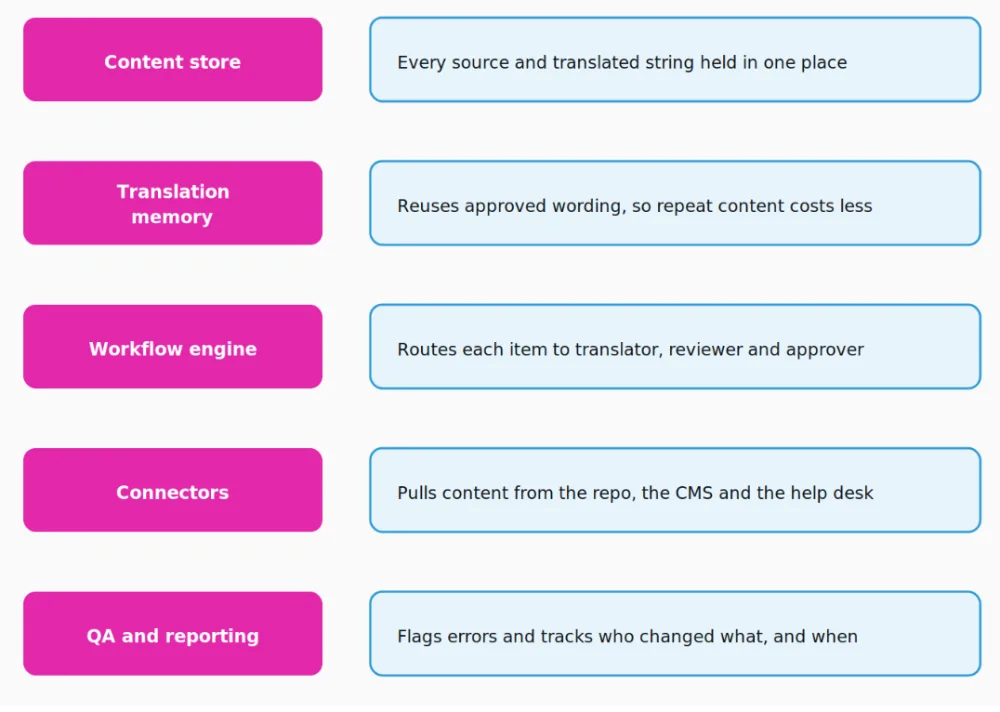
The five components of a TMS. Vendors differentiate on the fourth row far more than on the first three.
Connectors are where implementations succeed or stall. A system that reads the repository, the content management system and the help center directly removes the file handling that created the spreadsheet problem in the first place. A system that still needs a person to upload files has moved the bottleneck, not removed it.
What a translation management system will not do for you
A TMS moves content, tracks it, and reuses it. It does not judge it. Four problems stay firmly on the buyer’s side of the line after the purchase order clears.
- Source quality. Ambiguous English becomes ambiguous Japanese, faster, and in eleven markets at once.
- Internationalization (i18n). If the product concatenates strings, hardcodes date formats, or assumes German text takes the same space as English, a TMS will ship the breakage on schedule.
- Linguistic judgment. Somebody still has to decide whether the tone lands in Brazilian Portuguese and whether the legal disclaimer survived the trip.
- Ownership. The fastest way to strand a TMS is to buy it without naming an owner for each locale.
A useful way to frame the purchase is that the tool removes coordination cost and nothing else. Everything that looks like a quality problem still needs people, whether that is machine translation post-editing on the raw draft or a second linguist reviewing before anything goes live.
Do you need one? Four signals that settle it
A translation management system is worth buying when the cost of coordination exceeds the cost of the tool plus the cost of running it. Four measurable signals show where a team sits, and they are worth checking before a demo rather than after.
- Volume. More than roughly 20,000 words changing per month, which is not the same as total words published.
- Locales. Four or more languages live in production, not planned.
- Cadence. Weekly or faster updates to content that has already been translated once.
- Headcount. Five or more people touching strings across product, marketing and support.
Clear three of the four and the tool earns its keep inside a year. Clear one or two and it becomes a second place to look for the truth, which is the failure mode nobody budgets for. These thresholds are a working rule of thumb rather than an industry standard, and they move with content type. A fintech company shipping regulated disclosures crosses the line earlier than a company publishing a blog does.
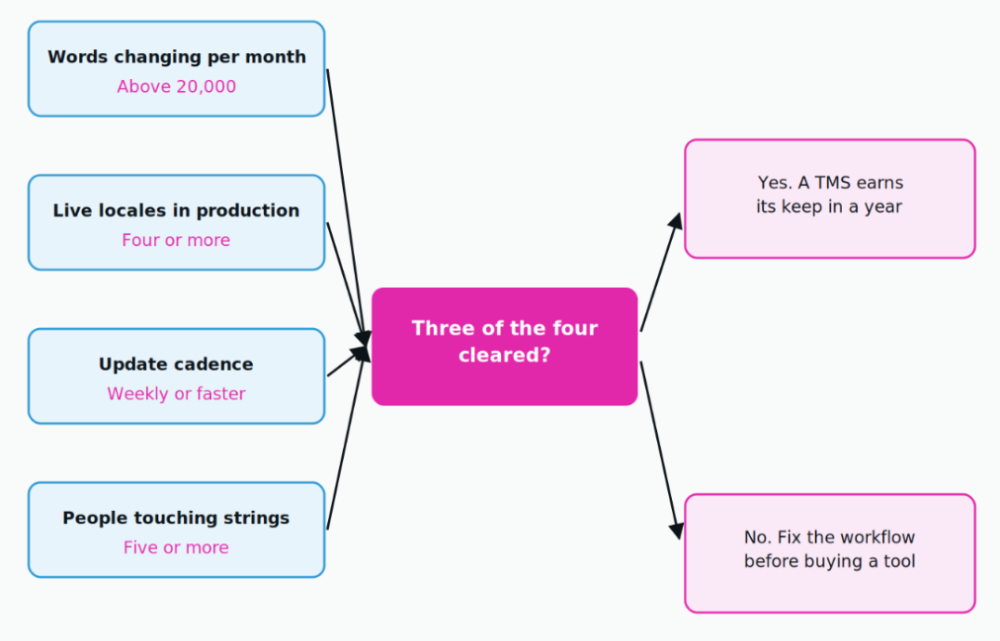
Score the four signals before booking a demo. The signals are independent, so any three of them count.
Two cleared signals usually means a workflow problem wearing a tooling costume. The fix is cheaper than a license. Agree on a single source of truth for strings, name an owner for each locale, and get the translation memory out of the vendor’s account and into one you control. Do that first and the buying decision gets easier in either direction, because a team that cannot say who owns German today will not answer it any faster inside new software.
Buy it, plug into a partner’s stack, or stay manual
Three paths are genuinely viable, and the middle one gets skipped most often. A team can license a TMS and operate it, work with a partner who already operates one, or keep a manual workflow and accept its ceiling.
| Path | When it fits | What it really costs | What breaks first |
|---|---|---|---|
| License and run your own TMS | Three or four signals cleared, dedicated owner in place | Seats, plus the admin time nobody scopes | Adoption, when no locale has an owner |
| Run through a partner’s stack | Between three and twelve locales, no localization headcount | Per-word rate only | Nothing, if TM export is in the contract |
| Stay manual, files and email | Two locales, quarterly updates, one owner | Rework, because nothing is reused | Version control, at the third locale |
The middle path is the one most shortlists omit, usually because no vendor is paid to suggest it.
The middle path deserves a serious look for teams between three and twelve locales. It removes the license cost and the administration without giving up the memory asset, provided the contract guarantees that the translation memory and the glossary can be exported on request.
The market has more tools than most teams have problems
There are more translation tools than there are distinct translation problems, and the count is falling. The Nimdzi Language Technology Atlas maps more than 920 language technology tools, and in a single year Nimdzi removed 18 percent of the vendors from its generic TMS subcategory. That is a consolidation signal worth reading before signing a three-year contract. For the wider architecture question, how a TMS sits alongside a CI/CD pipeline and a connector layer, the guide to a modern localization tech stack covers the full picture.
Two questions cut a shortlist faster than any feature matrix. Does it connect natively to the system where the content already lives, and can the translation memory and termbase be exported on day one without raising a support ticket. A tool that fails the second question is not a system of record. It is a lock-in.
Routing content is the decision the tool cannot make
Most teams apply one workflow to everything they translate, which is why they overpay on low-risk content and under-review the content that can actually hurt them. The NEX Translation Matrix™ scores each piece of content on five inputs and routes it to one of three outcomes.
The five inputs are content type, business risk, customer impact, regulatory requirement, and quality expectation. The three outcomes are AI drafting on its own, human linguists refining meaning on top of that draft, and independent linguistic quality assurance before anything is published.
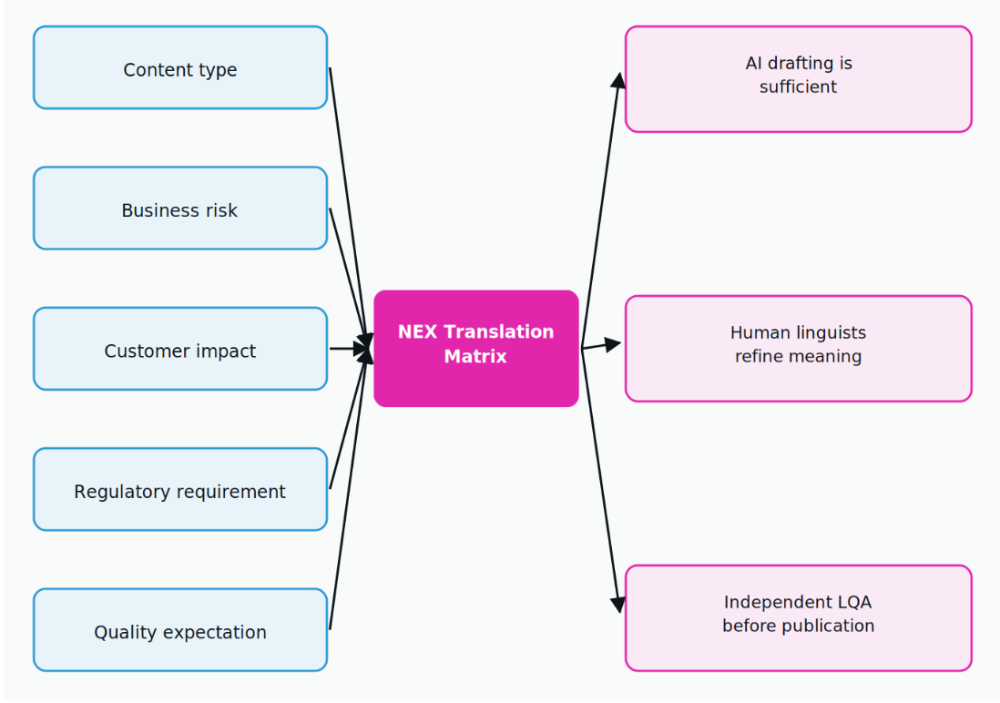
Five inputs, three outcomes. A release note and a payment disclosure leave the same sprint on different routes.
The routing rule matters more than the scoring. The NEX Translation Matrix routes content, not projects. A single release usually produces all three outcomes at once, so routing runs per string or per document, never per job. A TMS can execute that routing once somebody has defined it. No TMS defines it for you.
How NexTranslate works with or without a TMS
NexTranslate runs the multilingual content management layer either inside the system a team already licenses or in place of one. For teams that own a TMS, work runs through it, including Crowdin, Lokalise and Smartling, along with the content platforms behind them such as Contentful, WordPress and Webflow. For teams below the threshold, the same workflow runs on files (XLIFF, JSON, CSV, HTML and Markdown) with no license to buy.
The workflow is identical in both cases. AI produces the draft, native linguists refine meaning and terminology, and a quality check runs before delivery. Human proofreading is included at every tier rather than sold as an add-on, and per-word rates start at USD 0.03 for low-risk content. The transparent translation pricing page carries the full breakdown.
Product teams shipping on a weekly cadence tend to get more value from fixing the workflow than from buying the tool. Continuous localization for product teams covers the cadence side of that, and website and app localization covers the interface side.
Frequently asked questions
What is the difference between a translation management system and a CAT tool?
A CAT tool is where a linguist edits. A TMS is where the work is stored, routed and tracked. Computer-assisted translation handles segmentation, memory matching and terminology inside a single document. A TMS handles everything around that document: who has it, which version it is, what changed since last week, and where it publishes. Most modern TMS platforms ship with a CAT editor built in, which is why the two terms get used interchangeably.
Do small teams need a translation management system?
Usually not. A team running two or three locales with monthly updates can work from structured files and a partner who runs the workflow. The tool becomes worth its cost when the number of moving parts, meaning locales, contributors and update frequency, makes coordination the bottleneck rather than translation itself.
Can a translation management system replace human translators?
No. A TMS routes work and stores memory. It does not produce quality. It can call a machine translation engine to draft content, but the decision about whether that draft is publishable stays with a human reviewer. On regulated or customer-facing content, that review is the entire point.
What is translation memory and why does it matter?
Translation memory is a database of previously approved source and target segments that a TMS offers back when similar text appears again. It matters for two reasons. Repeated content costs less each time it recurs, and the memory is portable. It is the one part of the stack a buyer genuinely owns, so export rights belong in the contract rather than in a support conversation two years later.
How long does a TMS implementation take?
Plan in weeks rather than days, and expect the connectors to be the long pole rather than the software. Installing the tool is quick. Mapping content sources, agreeing the review workflow, and importing existing memory and terminology are what stretch the timeline, and skipping those steps is what produces a TMS nobody uses six months later.
Conclusion: the tool is cheap, the coordination is not
A translation management system solves a coordination problem. It does not solve a quality problem, a source content problem, or an internationalization problem, and buying one to fix those is an expensive way to learn the difference. Teams clearing three of the four signals should shortlist on connectors and export rights, not on feature counts. Teams clearing fewer should fix the workflow first, because the workflow is what a TMS automates, and automating a broken one produces broken output faster.
If you are weighing whether to license a system or run the work through a partner, we can map your content, locales and cadence against the four signals and tell you which side of the line you sit on. Request a quote and bring the content inventory.
Written by Karuppusamy Arunachalam, NexTranslate
Published August 2026 · Filed under Product & Technology
