




Website Translation Services: The Complete Guide for Global Businesses (2026)
-
Karuppusamy Arunachalam
- October 1,2026
Most online shoppers refuse to buy from a website that is not in their language. CSA Research puts the number at 76 percent, and 40 percent of consumers will not buy from a site in another language at all. If your website ships in English only, you are not just losing conversions in your target markets. You are being filtered out before the buyer even reaches the pricing page.
Website translation services fix that gap. They adapt your site for global buyers so that a visitor in Tokyo, Mexico City, or Berlin sees the product in the language, currency, and layout they expect. Done well, translation opens revenue you cannot reach any other way. Done badly, it produces a site that reads correctly but converts worse than the original.
This guide covers what website translation services are, why they matter in 2026, the step-by-step process real projects follow, what they cost, how multilingual SEO works, and how to keep translations current after launch. It is written for business owners, marketing leads, and product teams who want a clear picture before they hire.
1. Scope & Audit
languages, risk, surfaces
2. Internationalize
i18n, Unicode, layout
3. Files & TMS
JSON, XLIFF, memory
6. LQA Review
scored quality check
5. Human Post-Edit
MTPE, ISO 18587
4. AI Draft
fast first pass
7. In-context QA
layout, truncation
8. Launch
hreflang, metadata
9. Continuous Loc.
always-on sync
Setup (1-3) happens once. Production and delivery (4-8) repeat per market. Continuous localization (9) runs forever.
The full website localization process. Internationalization and setup happen once; translation, review, and launch repeat per market; continuous localization keeps every version current.
Website translation services convert your website content into other languages and adapt it for local audiences. They cover page copy, UI, images, SEO metadata, and ongoing updates. The best approach for most businesses in 2026 combines AI translation with human review, CMS integration, and multilingual SEO. Expect $0.10 to $0.25 per word for a professional hybrid workflow, and plan for translation to be an ongoing program, not a one-time project.
What are website translation services?
Website translation services are professional translation and localization workflows applied to the content on your website. That includes the visible copy on your pages, but also the pieces most teams forget until they hit a problem.
A complete website translation covers page body copy, navigation and menus, forms and error messages, product pages and checkout flows, blog posts and knowledge base articles, images with embedded text, video subtitles, meta titles and descriptions, alt text, URLs, cookie banners, and legal or compliance pages. It also covers the connective tissue that makes a site work in a new market: currency, dates, phone number formats, and payment methods.
Website translation is an ongoing process, not a one-time job. Every time you publish a new page, launch a product, update pricing, or refresh your homepage, new source content is created. A working translation program moves that new content into each locale on a defined cadence rather than as a batch after every marketing push.
Website translation tool vs website translation service
A translation tool is software: Google Translate, a WordPress plugin, or an AI translation API. It converts text on demand and gives you fast, cheap output. A translation service is a managed program: a provider plus native linguists plus technology plus a quality process. Tools are useful for internal drafts or low-risk content. A service is what most businesses need for pages that shape revenue, brand, or legal exposure. See our best website translation services roundup for a head-to-head comparison of providers.
Why your business needs professional website translation in 2026
English is not the default for the internet the way it used to be. Fewer than 26 percent of global internet users speak English at home. Buyers in non-English markets have more localized options every year, from local competitors to global platforms that ship in every major language on day one. The businesses that show up in a buyer’s language win the search result, the click, and the purchase.
Six specific reasons a professional website translation program is a 2026 priority:
- Reach new markets and increase conversions. Localized product pages convert two to three times better than English-only pages in most non-English markets, based on published SaaS and e-commerce benchmarks.
- Build trust and credibility with local buyers. A site that reads naturally in Spanish, Japanese, or Portuguese signals that the business takes the market seriously. A machine-only translation signals the opposite.
- Improve international search visibility. Multilingual SEO surfaces your pages for local keyword queries and helps AI Overviews cite your content in the target language.
- Better customer experience and lower support load. Users who can read the product themselves file fewer tickets, cancel less often, and recommend more.
- Legal and regulatory compliance. Quebec’s Bill 96, the EU Accessibility Act, and consumer protection laws in several markets require certain content in the local language.
- Competitive advantage over English-only competitors. Most SMBs still ship English-only. A localized site is a moat, especially in markets where enterprise competitors are slow to localize deeply.
Website translation vs website localization: what is the difference?
Translation and localization are related but distinct. Translation converts text from one language to another. Localization adapts the entire experience for a market. Both are usually needed. Confusing them is the most common cause of a site that reads correctly but converts poorly.
Translation focuses on words. It answers whether a sentence says the right thing in another language. Localization is broader. It covers currency, date and number formats, images and colors, payment methods, legal disclosures, and cultural fit. Transcreation is a third category, used for slogans, headlines, and ad copy that need creative adaptation rather than literal translation.
The table below shows how the three approaches compare on the dimensions that matter most to a website project.
| Aspect | Translation | Localization |
|---|---|---|
| Focus | Language accuracy | Full user experience |
| Scope | Text and meta content | Text, UX, formats, culture, compliance |
| Example | Translate a product page | Adapt pricing, imagery, and checkout for Japan |
| Best for | Support docs, blog, help center | Homepage, product pages, checkout, marketing |
For most business websites, marketing and product pages need localization while blog and help center content usually needs translation with light adaptation. Our translation and localization service covers both.
Types of website translation services
Six delivery models are common in 2026: pure machine translation, AI translation with human post-editing, professional human translation, transcreation, translation proxy platforms, and CMS plugins with integrated translation. Each has different trade-offs on speed, cost, and quality. For most business-critical pages, the hybrid model (AI draft plus native linguist review) is the current best-value option.
Rather than compare every provider here, we maintain a dedicated head-to-head roundup: see our comparison of the best website translation services for the 2026 edition, updated as vendors ship changes.
How website translation services work: step-by-step process
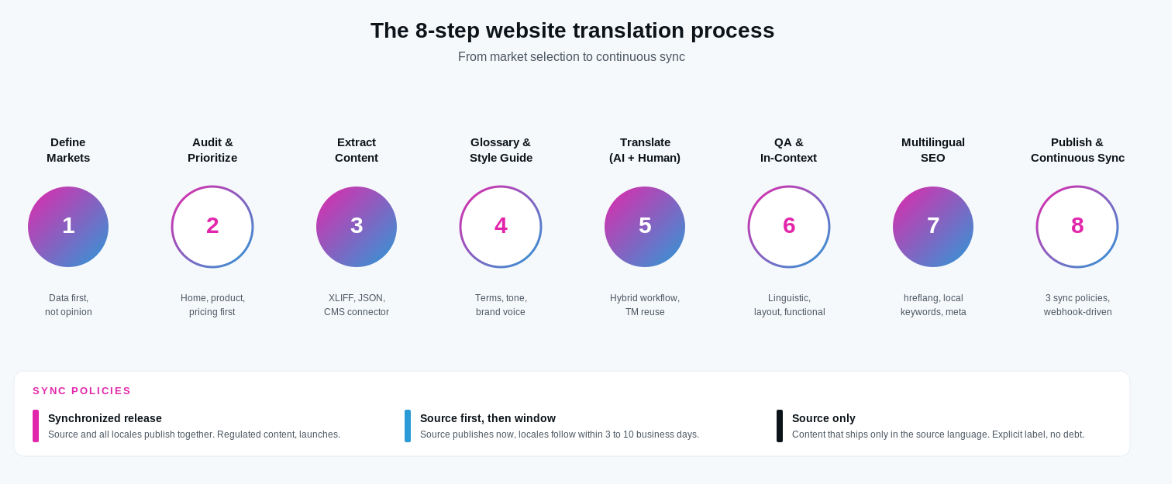
Every professional website translation project follows a version of the same eight-step process. Skipping steps is the most common source of the “translated but not converting” problem. Understanding the process helps you scope a project accurately and evaluate a provider against a real workflow.
Step 1: Define target markets and languages
Start with data, not opinion. Look at your existing traffic by country, free trial or signup conversion by region, and where your competitors already ship. The most common first three languages for a B2B website in 2026 are Spanish (Latin America and Spain), German, and Brazilian Portuguese or French. Japanese is a common second-phase market: higher lift, but strong lifetime value when the localization is done well. For a deeper framework on market and language selection, see our SaaS localization playbook.
Step 2: Audit and prioritize website content
Not every page needs to launch on day one. Pull a crawl of your site and rank pages by revenue impact and traffic. The high-priority set is usually the homepage, top three to five product or service pages, pricing, checkout, and contact. Blog, knowledge base, and secondary marketing content follow in a second wave. Auditing first prevents the trap of translating archived posts before the pages that actually convert.
Step 3: Content extraction and preparation
Content needs to leave the CMS in a translator-friendly format. Common file formats include XLIFF, JSON, and HTML fragments. Most modern platforms have CMS connectors or APIs that automate extraction: WordPress, Shopify, Webflow, Contentful, and headless setups all support this. Extraction also includes hidden content: alt text, meta descriptions, form labels, error messages, and email templates.
Step 4: Build a glossary and style guide
A glossary defines how product names, feature names, and industry terms are translated in each locale. A style guide sets tone, voice, and formatting rules. Both are built once and reused across every future translation. This is the single highest-leverage investment in a translation program: teams that skip it produce inconsistent translations and pay to correct the same terms across multiple projects.
Step 5: Translation (AI plus human linguists)
The current best-value approach is a hybrid workflow. AI produces a first-pass translation that captures the meaning at speed and low cost. A native linguist with subject-matter expertise then reviews, refines, and rewrites where needed. Translation memory ensures that repeated phrases are translated consistently across pages and reused on future updates, which lowers cost over time.
Step 6: Quality assurance and in-context review
QA covers three layers: linguistic (grammar, terminology, style), functional (links work, forms submit, CTAs render), and layout (text expansion does not break the design, right-to-left languages render correctly for Arabic and Hebrew). In-context review means the linguist sees the content on the actual page rather than in a spreadsheet, which catches problems a text-only review misses.
Step 7: Multilingual SEO optimization
The translated pages need to be discoverable in the target market. That means local keyword research (not literal translation of English keywords), translated meta titles and descriptions, translated URLs where possible, hreflang tags, and localized XML sitemaps. Skipping this step is the reason many translated sites get traffic in English but not in the languages they invested in.
Step 8: Publishing and continuous sync
Publishing is not the end of the project. Source content changes constantly: new pages, updated pricing, refreshed hero copy. A working translation program defines a sync policy that keeps every locale current.
Three common sync policies:
- Synchronized release. Source and all locales publish at the same time. Best for regulated content, product launches, and pricing changes.
- Source first, then window. Source publishes immediately, translations follow within a defined window (usually 3 to 10 business days). Best for marketing content where speed matters but locale coverage is required soon after.
- Source only. Some content ships only in the source language (usually company blog or event pages). Explicitly labeling this policy prevents translation debt from piling up on content nobody needs translated.
Every page or content type in the CMS should be assigned to one of these three policies so the translation program has predictable scope. Continuous localization tools automate the sync using webhooks from the CMS to the translation platform. Our website and app localization service includes this automation setup as part of a launch.
Multilingual SEO: make your translated website rank
Translation without multilingual SEO is invisible. A translated page that never appears in a local search result is not much better than no translation at all. Getting multilingual SEO right is what separates a translation project from a growth channel.
The core multilingual SEO checklist for 2026:
- Local keyword research per language. Do not translate your English keywords. Buyers in Spain search for different terms than buyers in Mexico, even in the same language. Use a per-market keyword tool to find the actual queries.
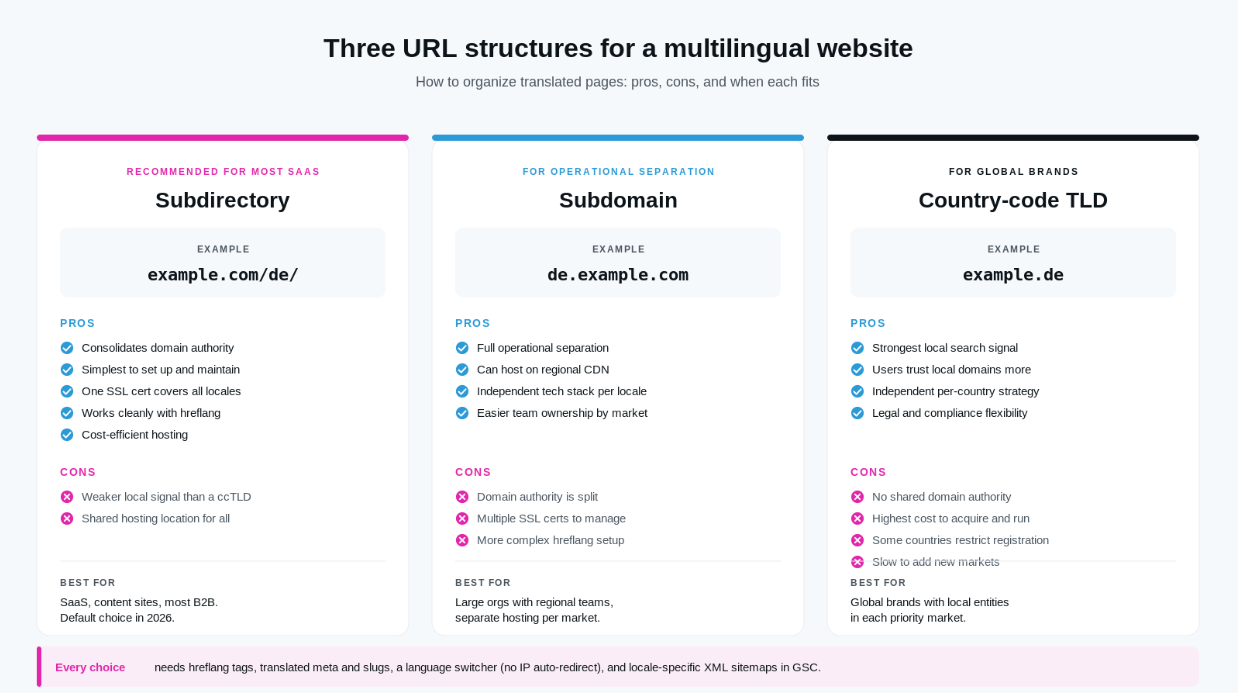
- URL structure. Three options: country-code top-level domains (example.de), subdomains (de.example.com), or subdirectories (example.com/de/). Subdirectories are the simplest for most SaaS and content sites and consolidate domain authority. Figure 2 below compares all three side by side.
- hreflang tags and x-default. Every translated page must declare its language and region using hreflang, and the source page should include an x-default. Google’s official hreflang documentation is the reference.
- Translated meta titles, descriptions, alt text, and slugs. Every SEO field needs a locale-specific version. Auto-generated versions from source content undercut ranking potential.
- Avoid IP-based auto-redirects. Show a language switcher instead. Auto-redirects break search engine crawlers and confuse users on VPNs.
- Multilingual XML sitemaps. One sitemap per locale, submitted to Google Search Console. Verify each locale as a separate property.
- Local backlinks. Link building in the target market is what pushes a translated page from indexed to ranking. This is where most translation programs stop investing and where the difference between mediocre and strong locale performance shows up.
- Optimize for AI Overviews in each language. AI answer engines pull citations differently per language and market. Content structured with clear definitions, question-format H2s, and cite-worthy statistics performs better across languages.
How much do website translation services cost?
Website translation cost depends on content volume, target languages, and the quality model. Most professional services price on a per-word basis, though some price per project or per language on a subscription. Typical 2026 ranges:
| Pricing factor | How it affects cost |
|---|---|
| Word count | Base multiplier. Most pricing is per source word. A 20,000-word site costs roughly 20x a 1,000-word site at the same rate. |
| Language pair | Common pairs (English to Spanish, French, German) are lowest. Rare pairs (English to Icelandic, Basque) run 30-50% higher. |
| Content complexity | Legal, medical, and financial content usually costs 20-40% more due to specialist linguists. |
| Translation method | Pure AI: $0.01-0.03/word. AI + human review (MTPE): $0.07-0.12/word. Full human translation: $0.15-0.25/word. |
| Turnaround time | Standard turnaround is included. Rush delivery adds 20-30%. |
| Number of languages | Volume discounts usually kick in at 3+ languages or 50,000+ words. |
| Technical integration | CMS connector setup and TMS integration are usually one-time fees ($500-$2,500). |
| Ongoing updates | Translation memory reduces cost on repeat content by 30-70% over time. |
These are industry ranges, not quotes. Every provider prices differently based on the quality tier and included services. NexTranslate’s transparent three-tier pricing publishes exact per-word rates and included services, and our translation services pricing breakdown walks through the tier structure in more detail.
Tips to reduce website translation cost
- Use translation memory. Every repeated phrase across your site is translated once and reused, cutting cost 30-70% on ongoing updates.
- Prioritize high-impact pages first. Homepage, top product pages, pricing, checkout, contact. Leave archived blog posts for later.
- Use MTPE (AI plus human review) for low-risk content. Save full human translation for high-stakes pages.
- Clean source content before translation. Fix typos, remove duplicated sections, and consolidate near-duplicates. Every word saved at source is words saved in every locale.
- Bundle new content. Sending a page every day costs more in coordination than sending a week of pages at once.
1. Volume & TM reuse
words billed after memory
2. Language pair
common vs rare
3. Content complexity
marketing to legal/medical
4. Turnaround speed
standard vs rush (+20–30%)
5. What is included
review, QA, PM bundled?
Total Cost
of translation
(rate × scope)
The five factors behind a translation quote. The advertised per-word rate is only one input; volume, language, complexity, speed, and what is bundled together decide the real total.
Want native-quality website translation without paying for three separate steps?
NexTranslate delivers translation, proofreading, and QA at proofreading-only pricing across 60+ languages. Tell us about your site and we will scope a quote.
How long does it take to translate a website?
Timeline depends on site size, language count, quality model, and whether the target languages are common or rare. Typical ranges:
- Small site (10-20 pages, ~5,000-10,000 words), one language: 5-10 business days for a hybrid workflow, faster for AI-only.
- Medium site (50-100 pages, ~30,000-50,000 words), one language: 3-6 weeks including QA.
- Large or e-commerce site (500+ pages, 200,000+ words), 3+ languages: 8-14 weeks for the first wave, then continuous sync for updates.
These are one-time launch estimates. After launch, the sync model matters more than raw speed. A well-configured continuous localization workflow can push new content into every locale within 24 to 72 hours of the source page publishing.
How to evaluate website translation quality
The single most useful skill for anyone buying website translation is knowing how to spot good work from bad. Providers vary widely, and the difference is rarely visible on a demo. Four practical evaluation methods:
Ask for a sample translation, not a portfolio
Send the provider 500 to 1,000 words of your real content in a target language you or a stakeholder can evaluate (native speaker on your team, an existing customer in market, or an independent reviewer). A demo portfolio proves nothing. A sample of your content translated by their actual linguists is the only reliable signal.
Check terminology consistency
Take the sample and look for product names, feature names, and industry terms. Are they translated consistently, or does the same term appear three different ways across paragraphs? Inconsistency is a warning sign that the provider does not use a glossary or translation memory.
Verify in-context review is offered
Text-only translation misses layout and functional problems. Ask specifically whether the workflow includes in-context review on the rendered page, not just the source strings. Providers that skip this step ship translations that read correctly but break the actual UI.
Confirm the QA process on paper
A serious provider can describe their linguistic quality assurance process in one page: who reviews, what they check, what error rate is acceptable, and how errors are flagged and corrected. Our approach to linguistic quality assurance is a reference for what to expect. If the provider cannot articulate their QA in writing, they probably do not have a repeatable one.
For side-by-side vendor comparisons evaluated against these criteria, see the provider roundup linked earlier in the tool-vs-service section.
Common website translation mistakes to avoid
Seven patterns show up over and over in translation projects that stall or underperform.
- Relying only on raw machine translation for high-stakes pages. Fast and cheap, but produces layout breaks, terminology drift, and lost brand voice on pages that drive revenue.
- Translating keywords literally instead of researching local search terms. Users in Spain do not search for the direct Spanish translation of your English keyword. Local keyword research is not optional.
- Ignoring text expansion and layout breaks. German runs 30 percent longer than English. Japanese can be 50 percent shorter. UI components with fixed widths break in both directions.
- Forgetting hidden content. Images with embedded text, PDFs, email templates, form validation messages, cookie banners, and checkout error states are all part of the site and all need translation.
- No glossary or translation memory. Every translator interprets terms differently, and cost stays high because repeated content is retranslated instead of reused.
- No process for updating translations when source content changes. Locales drift out of sync within weeks of launch. Users see stale pricing, outdated feature copy, or missing product pages.
- Skipping cultural review. Colors, idioms, and symbols carry different meaning in different markets. A cultural review adds one QA layer and prevents launches that inadvertently offend or confuse the target audience.
The role of AI in website translation
AI translation quality has jumped significantly in the last two years. Modern large-language-model translation captures meaning and grammar accurately on common content types in high-resource languages. That has changed what a professional translation workflow looks like.
What AI does well:
- Speed. Thousands of words per minute versus hundreds per hour for human translators.
- Scale. A large content library can be drafted in hours instead of weeks.
- Cost. AI drafts cost 5 to 20 times less than pure human translation.
Where AI still needs a human:
- Brand voice and tone. AI defaults to neutral corporate voice, which erases what makes your brand distinctive.
- Nuance and cultural fit. Idioms, sarcasm, and market-specific references still need a native speaker.
- Regulated content. Legal, medical, and financial content require accuracy guarantees AI alone cannot provide.
- Rare languages. AI quality varies widely across language pairs. English to Spanish is excellent. English to Sinhala is not.
The current best-value model is AI draft plus native linguist refinement, sometimes called machine translation post-editing or MTPE. AI produces the first pass at speed. A trained linguist reviews, corrects, and polishes. This is the model NexTranslate runs by default across 60-plus languages.
Website translation checklist for global businesses
A scannable checklist you can copy into your project plan:
- Target markets and languages confirmed with data
- Content audit complete with pages prioritized
- CMS extraction or connector configured
- Glossary and style guide built
- Hybrid AI plus human translation workflow selected
- Translation memory in place
- Linguistic, functional, and layout QA planned
- Multilingual SEO checklist run (hreflang, sitemaps, meta)
- Sync policy defined for every page type
- Launch communication plan for local audiences
- Post-launch monitoring: conversion, ticket volume, indexing
- Continuous update workflow live in the CMS
How NexTranslate helps businesses translate their websites
NexTranslate is an AI plus human translation and localization company built for websites that need to scale globally without losing quality or spending on separate proofreading and QA vendors.
- Hybrid workflow. AI draft for speed, refined by native linguists for accuracy and brand voice.
- 60-plus languages, certified linguists and domain specialists.
- Translation, proofreading, and QA included at proofreading-only pricing.
- 24/7 turnaround with a dedicated project manager on every account.
- Related services: website and app localization, software UI translation, marketing transcreation, MTPE, linguistic QA.
- Industries: Technology and SaaS, e-commerce, healthcare, legal, and fintech, with subject-matter linguists in each.
- Global delivery. US headquarters with a delivery hub in Chennai, India.
Which markets to localize first
Localize first
high demand, low effort
Plan & invest
high demand, high effort
Quick wins
low demand, easy to serve
Deprioritize
low demand, hard to serve
A simple way to sequence markets. Localize the high-demand, low-effort markets first, plan and invest in the high-demand hard ones, and deprioritize the rest until the evidence changes.
Frequently Asked Questions
1. What are website translation services?
Website translation services are professional workflows that convert your website content into other languages and adapt it for local audiences. They cover page copy, UI, images, SEO metadata, and the ongoing updates required to keep every locale in sync with the source language.
2. How much do website translation services cost?
Cost depends on volume, languages, and quality model. Typical ranges in 2026: pure AI translation runs $0.01 to $0.03 per word, hybrid AI plus human review runs $0.07 to $0.12 per word, and full human translation runs $0.15 to $0.25 per word. Most professional website programs use the hybrid model.
3. How long does it take to translate a website?
A small site (10-20 pages) takes 5-10 business days in one language for a hybrid workflow. A medium site (50-100 pages) takes 3-6 weeks. A large or e-commerce site with multiple languages takes 8-14 weeks for the first wave, then continuous sync for updates.
4. Can I use Google Translate for my business website?
Google Translate is useful for internal drafts and low-risk content. For revenue-critical pages (homepage, product pages, pricing, checkout, legal), raw machine translation almost always underperforms a hybrid workflow. Bad translations on high-stakes pages cost more in lost conversions than the translation itself would have cost.
5. What is the difference between website translation and website localization?
Translation converts words from one language to another. Localization adapts the full experience for a market, including currency, dates, images, payment methods, cultural fit, and compliance. Both are usually needed. Business-critical pages need localization; support and blog content usually need translation with light adaptation.
6. Is AI translation accurate enough without human review?
For high-resource languages (Spanish, French, German, Portuguese, Italian) and general content, AI translation quality is high. It still misses brand voice, cultural nuance, and regulated content requirements. The current best-value model is AI draft plus native linguist review, which captures the speed of AI and the judgment of a professional translator.
7. Will translating my website help SEO?
Yes, if the translation is paired with multilingual SEO. Translated pages need hreflang tags, local keyword research, translated meta titles and descriptions, and localized URLs. Translation without multilingual SEO produces pages that exist but do not rank in the target market.
8. Do I need a separate website for each language?
Not usually. Most businesses use subdirectories (example.com/es/, example.com/de/) on a single domain. Subdirectories consolidate domain authority and simplify hosting. Country-code top-level domains (example.de) are appropriate for global brands that already have local entities in each market.
9. Which languages should I translate my website into first?
For B2B SaaS and most global businesses in 2026: Spanish (Latin America and Spain), German, and Brazilian Portuguese or French are the common first three. Look at your existing traffic by country and free trial or signup conversion by region to confirm the right order for your specific audience.
10. How do I keep translations updated when my website changes?
Define a sync policy for every page type: synchronized release (source and locales publish together), source first then window (locales follow within 3 to 10 days), or source only (some content stays in the source language). A continuous localization pipeline connects the CMS to the translation platform via webhooks so new content flows into translation automatically.
Conclusion
Website translation is not a one-time project. It is a program that runs for as long as your site changes. The businesses that get this right in 2026 pick their first three languages with data, use a hybrid AI plus human workflow to hit both speed and quality, invest in multilingual SEO from day one, and define a sync policy that keeps every locale current as the source site evolves.
At NexTranslate, we help businesses build website translation services that grow with them. Our hybrid workflow delivers translation, proofreading, and QA at proofreading-only pricing across 60-plus languages, with dedicated project managers on every account. To scope your project, contact our team.
- October 1,2026
- Filed under / Translation Services
Get a free website translation quote
Tell us about your site, your languages, and your timeline. We will send back a scoped quote covering translation, proofreading, and QA at proofreading-only pricing.